Abstractions 3: IPC, Pipes and Sockets

Source: UC Berkeley CS162, Fall 2020/2021 - Prof. John Kubiatowicz, Lecture 5

CS162 Lecture 5 - Abstractions 3: IPC, Pipes and Sockets

Processes are isolated by design - so how do two of them talk? This lecture builds inter-process communication (IPC) on the file abstraction from the last lecture: a pipe connects two processes on one machine, a socket connects two processes across a network, and both are used through the same read/write calls. It ends by building a real client/server.

The key idea: communication looks like file I/O

The whole lecture rests on one idea: sending data between processes should look exactly like writing to and reading from a file. One side does write(wfd, ...), the other does read(rfd, ...), whether they are on the same machine or opposite sides of the world.
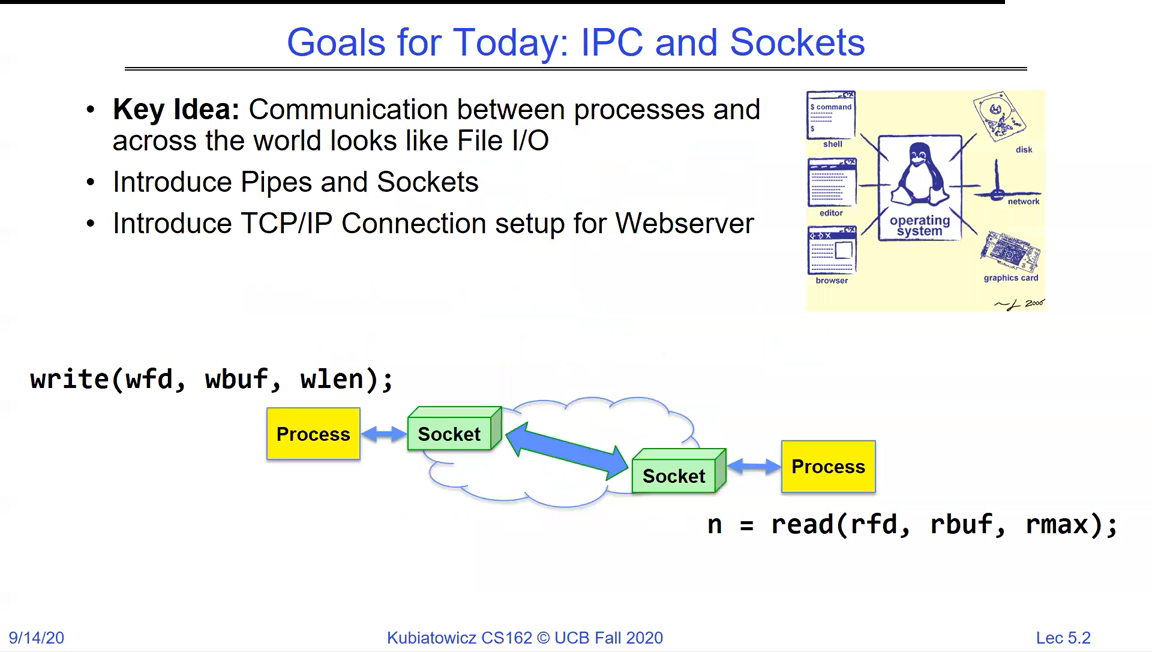
Goals slide: communication between processes looks like File I/O; introduce pipes and sockets; introduce TCP/IP connection setup for a web server; write(wfd, wbuf, wlen) on one process flows through a socket to n = read(rfd, rbuf, rmax) on another
The plan: make IPC look like file I/O. `write` on one end, `read` on the other, connected by a pipe (same machine) or a socket (across a network).

Why processes need a channel: isolation

Recall why this is even a problem. Each process has its own address space; the hardware translation tables guarantee one process cannot see another's memory. That isolation is exactly what makes direct communication impossible - so the OS must provide an explicit channel.
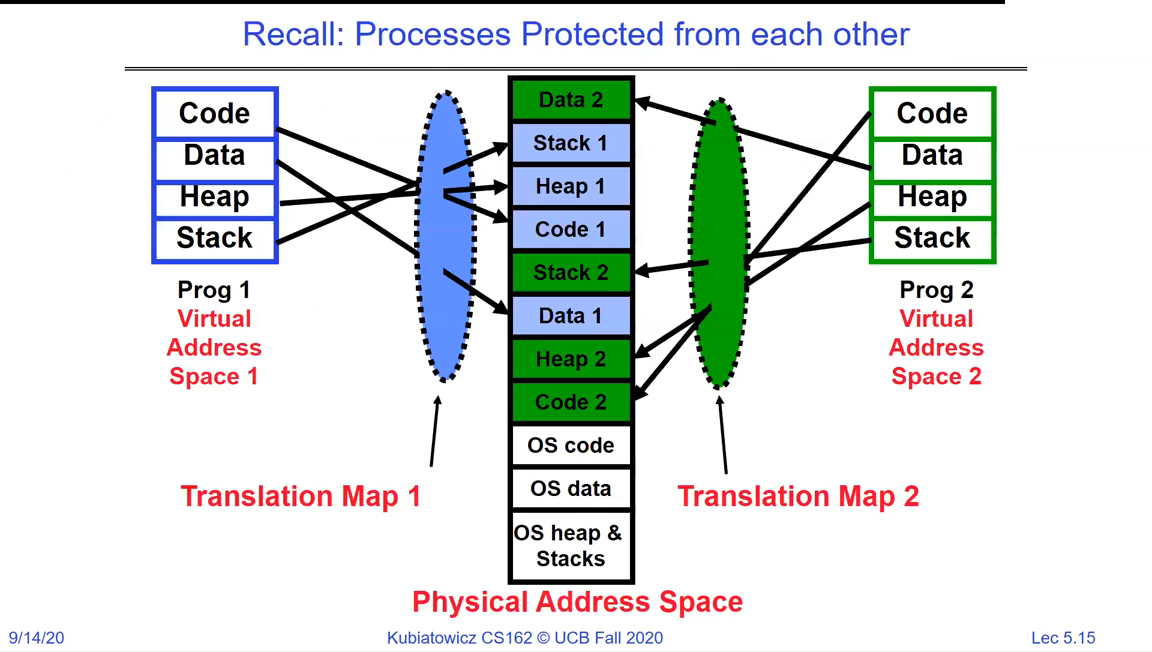
Two processes with separate virtual address spaces mapped through Translation Map 1 and Translation Map 2 into one physical address space, showing they cannot reach each other's memory
Isolation is the point: separate translation maps keep Process 1 and Process 2 out of each other's memory. Communication therefore needs a channel the OS hands both of them - shared memory (a topic for later) or the file-like channels in this lecture.

Pipes

A pipe is a one-directional, in-kernel byte queue with two ends: you write to one file descriptor and read from the other. pipe() returns both descriptors at once.
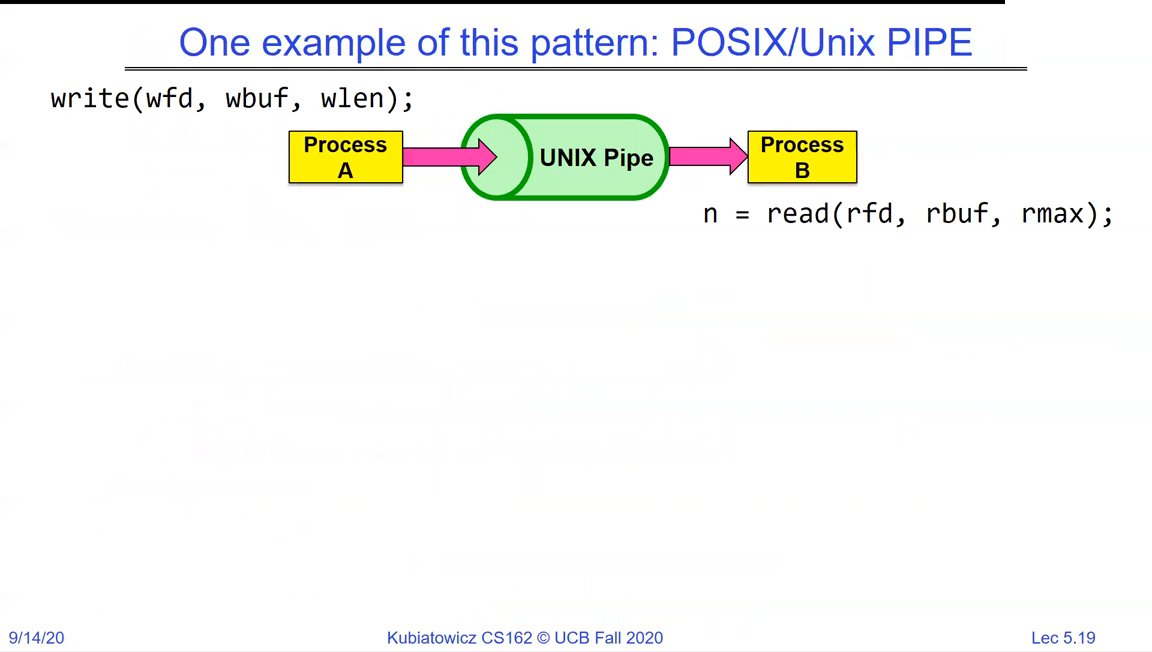
POSIX/Unix pipe: Process A does write(wfd, wbuf, wlen) into a UNIX Pipe, and Process B does n = read(rfd, rbuf, rmax) out of it
A pipe is a kernel-buffered one-way channel. One end is the write end, the other the read end - the same `read`/`write` you use on files.

Within a single process you can see the mechanics: create the pipe, write to pipe_fd[1], read from pipe_fd[0].

Single-process pipe example: int pipe_fd[2]; if (pipe(pipe_fd) == -1) fail; write(pipe_fd[1], msg, ...); read(pipe_fd[0], buf, BUFSIZE); close(pipe_fd[0]); close(pipe_fd[1])
A pipe within one process. `pipe()` fills a two-element array: index 1 is the write end, index 0 is the read end. Useless alone - but combine it with `fork` and the two ends land in two different processes.

Pipes between processes

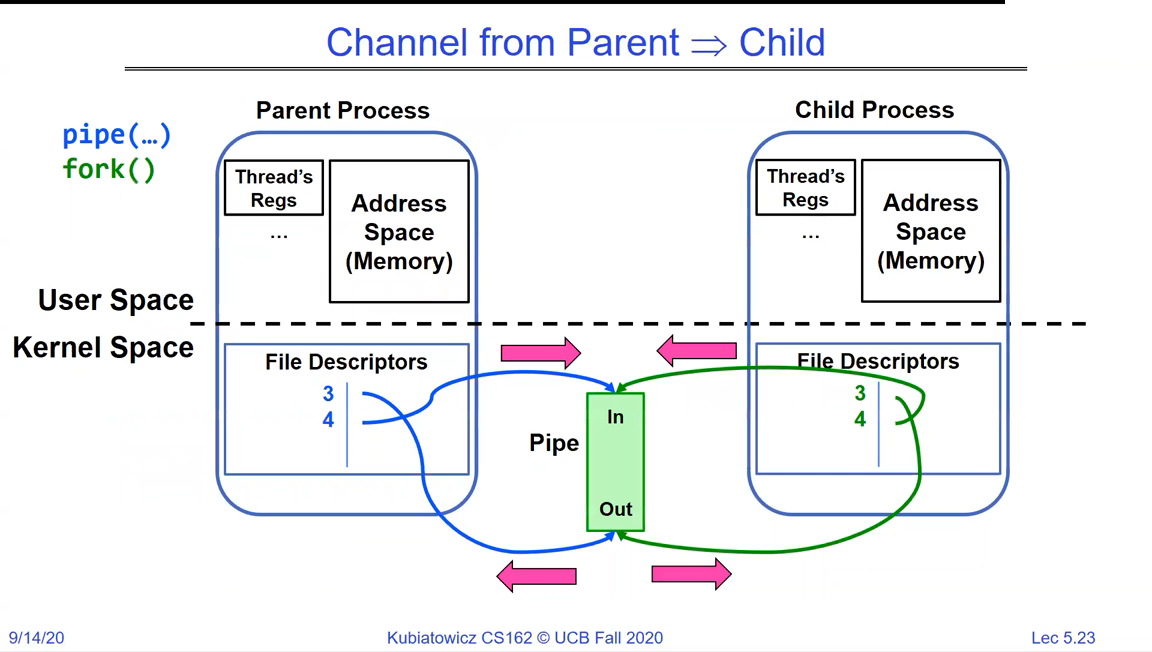
The real use is pipe then fork: the child inherits the descriptor table, so both processes hold both ends of the same pipe. Each closes the end it does not use, leaving a one-way channel from parent to child (or the reverse).
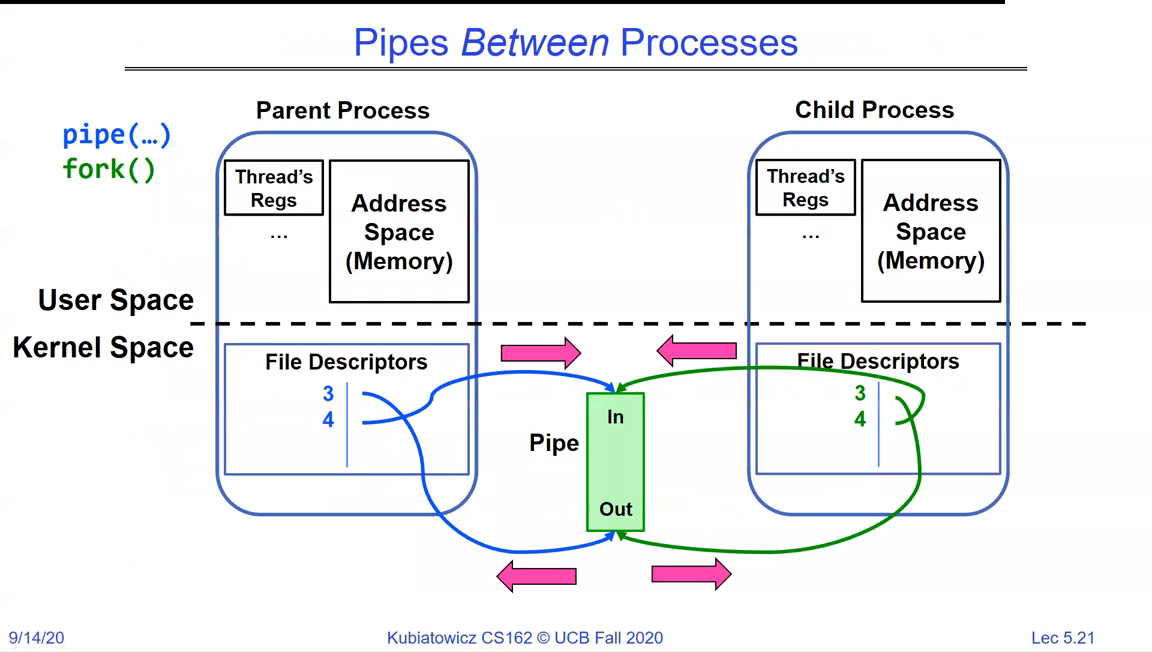
Pipes between processes: parent calls pipe() then fork(); both parent and child file-descriptor tables point at the pipe's In and Out ends in the kernel
`pipe` then `fork`: the child inherits the descriptors, so the pipe now spans two processes. This is how a shell wires one command's output into the next command's input.
Channel from Parent to Child: after fork, the parent keeps the write end and closes the read end; the child keeps the read end and closes the write end, giving a clean one-way channel
Making it one-way: the parent closes the read end and the child closes the write end. Now data flows parent -> child only - clean, and necessary for EOF to work.
Close the ends you don't use

After fork, every pipe end is open in both processes. If a reader leaves the write end open, it will never see end-of-file, because some descriptor could still write. Each process must close the ends it doesn't use, or the pipe hangs.

EOF on a pipe

That closing discipline is what makes EOF meaningful: a read on a pipe returns 0 (end of file) only once all write ends are closed.
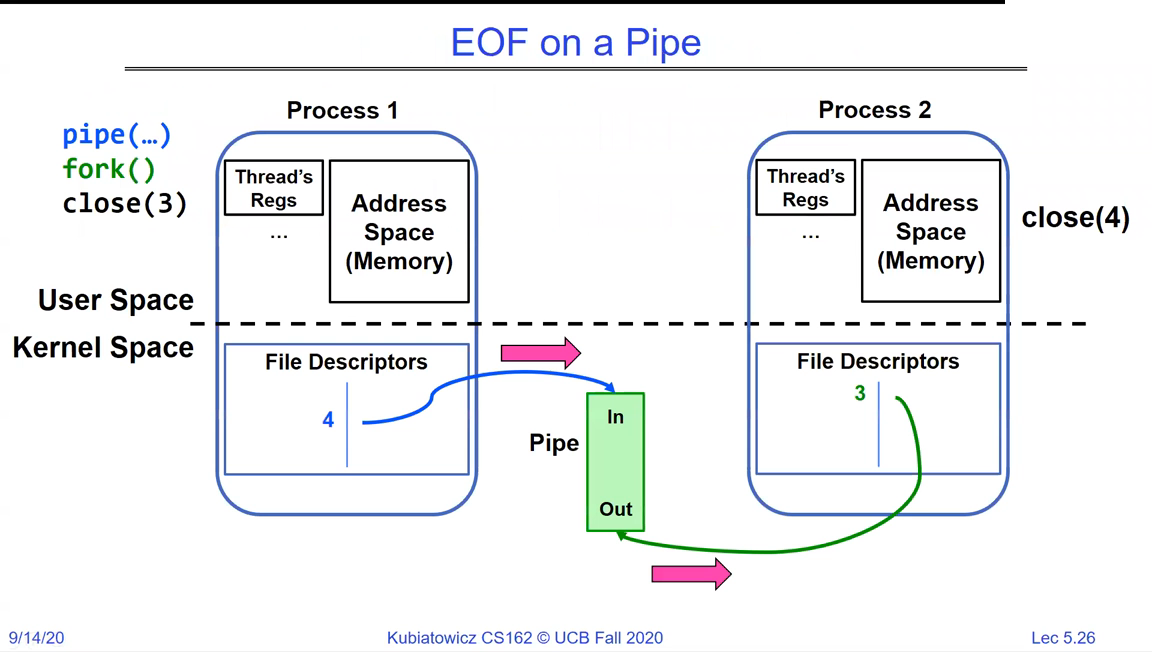
EOF on a Pipe: two processes with the pipe's In and Out ends; annotations close(3) and close(4) show closing the write descriptors so the reader eventually sees EOF
EOF arrives only when the last write end closes. As long as any process (including the reader itself) holds a write descriptor, the reader blocks instead of seeing end-of-file.
Pipe semantics
  • pipe() returns two descriptors: [0] is the read end, [1] is the write end.
  • A pipe is one-directional and kernel-buffered; read blocks when it's empty, write blocks when it's full.
  • read returns 0 (EOF) only when all write ends are closed - so unused ends must be closed.

Once you can communicate, you need a protocol

A channel moves bytes; it says nothing about what they mean. A protocol is the agreement on how to communicate - the syntax (message format and order) and semantics (what each message means, and what to do on a timeout).
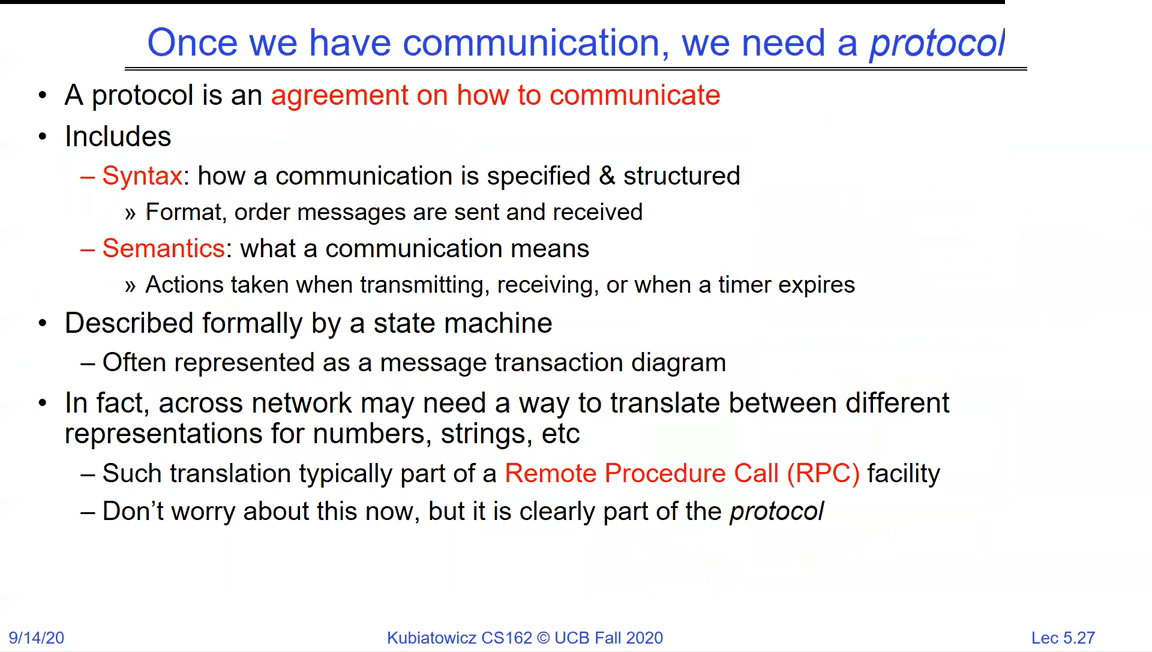
Slide 'Once we have communication, we need a protocol': a protocol is an agreement on how to communicate, including syntax (format, order of messages) and semantics (meaning, actions on timeout); often described by a state machine; translation across a network is part of RPC
A protocol is the agreement layered on top of the channel: message syntax and semantics, often formalised as a state machine. Translating data across machines is the job of higher layers like RPC.

Client/server: cross-network IPC

Scale the idea up and you get the client/server model: many clients talk to one server over the network. The channel is now a socket.
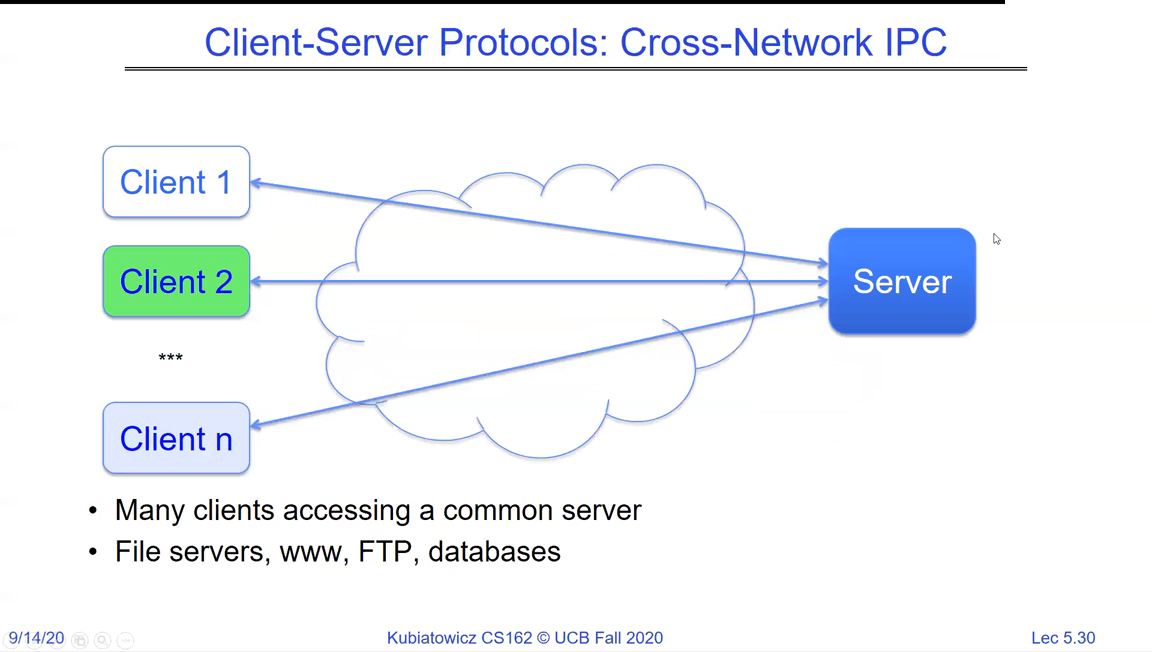
Client-Server Protocols cross-network IPC: Client 1, Client 2, ... Client n connect through a network cloud to a single Server; many clients accessing a common server such as file servers, www, FTP, databases
Cross-network IPC: many clients, one server, one common service (web, FTP, a database). The socket is the pipe's networked cousin.

A socket behaves just like a file descriptor with two queues: write appends to the outgoing queue, read drains the incoming one. Unlike a pipe it is bidirectional.
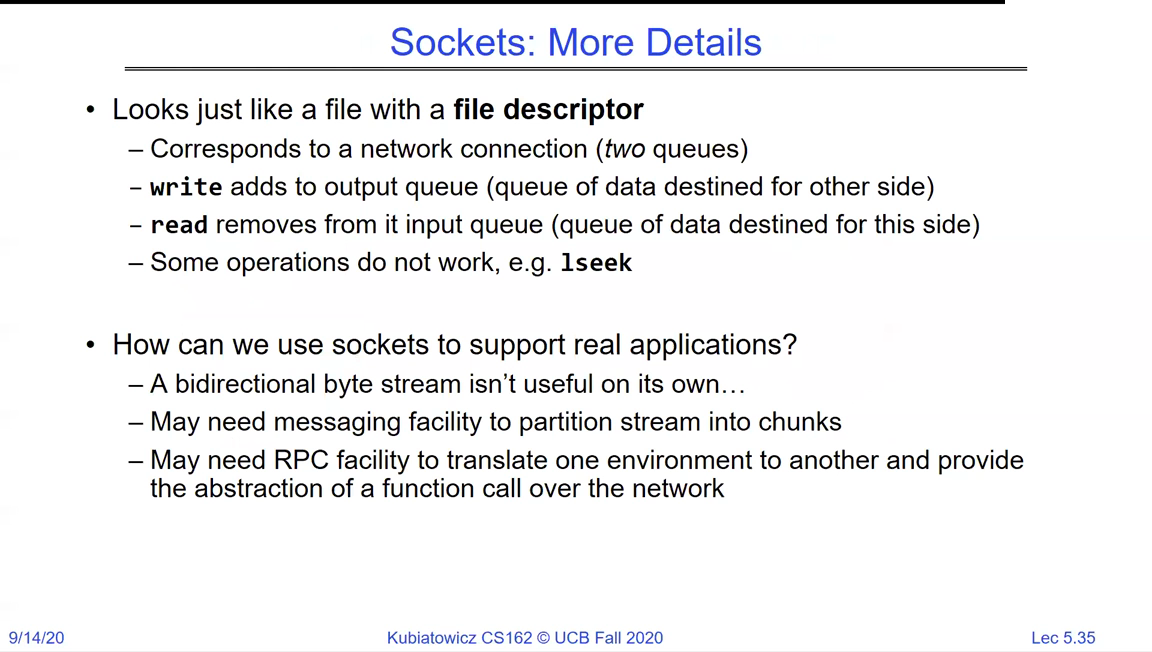
Sockets: More Details - a socket looks just like a file with a file descriptor; it corresponds to a network connection (two queues); write adds to the output queue, read removes from the input queue; some operations like lseek do not work
A socket is a file descriptor over a network connection: two queues, one each way. `read`/`write` work as always; position-based calls like `lseek` don't, because a stream has no random access.

Setting up a connection over TCP/IP

Before you can read/write, the two ends must be connected. The server creates a listening socket on a well-known port; a client connects to it; the connection is identified by a 5-tuple (source IP/port, destination IP/port, protocol).
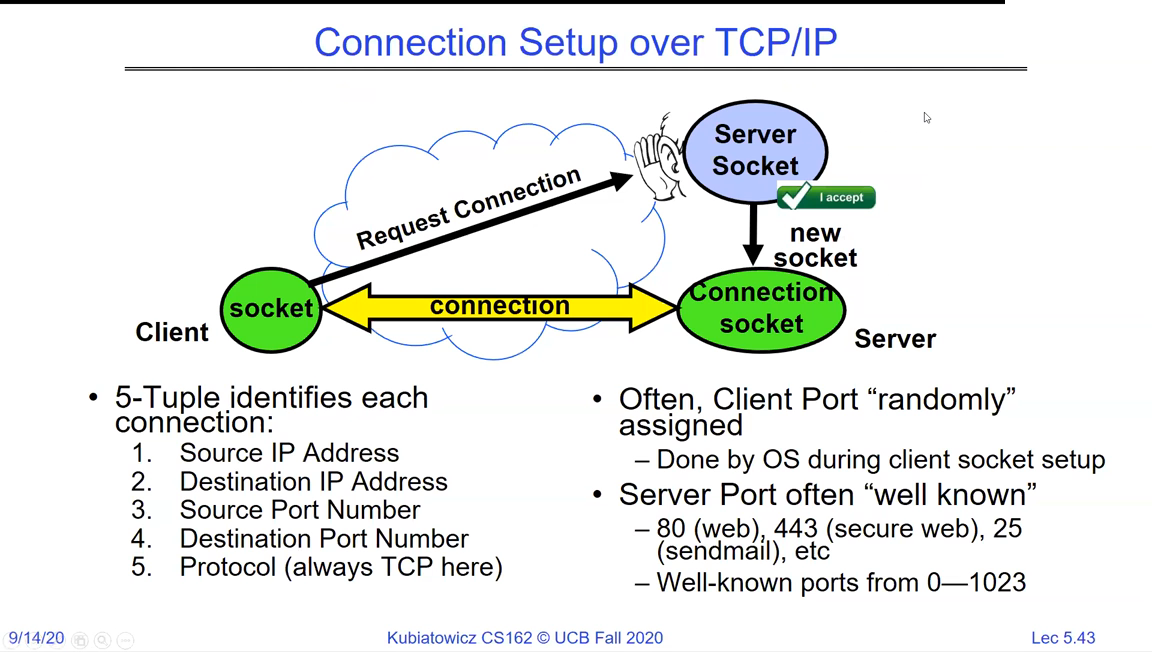
Connection Setup over TCP/IP: a client socket requests a connection to a server socket on a known port; the server accepts, creating a new connection socket; a 5-tuple (source IP, destination IP, source port, destination port, protocol) identifies each connection; client ports are assigned randomly, server ports are well known (80 web, 443 secure web, 25 sendmail)
Connection setup: the server listens on a well-known port; accepting a client creates a fresh connection socket dedicated to that client, so the listening socket stays free. Each connection is named by its 5-tuple.
What identifies a connection
  • A connection is a 5-tuple: source IP, source port, destination IP, destination port, and protocol (TCP here).
  • Server ports are well-known: 80 (web), 443 (HTTPS), 25 (mail); client ports are usually assigned at random by the OS.
  • accept returns a new socket per client, so the original listening socket keeps accepting more.

The socket API

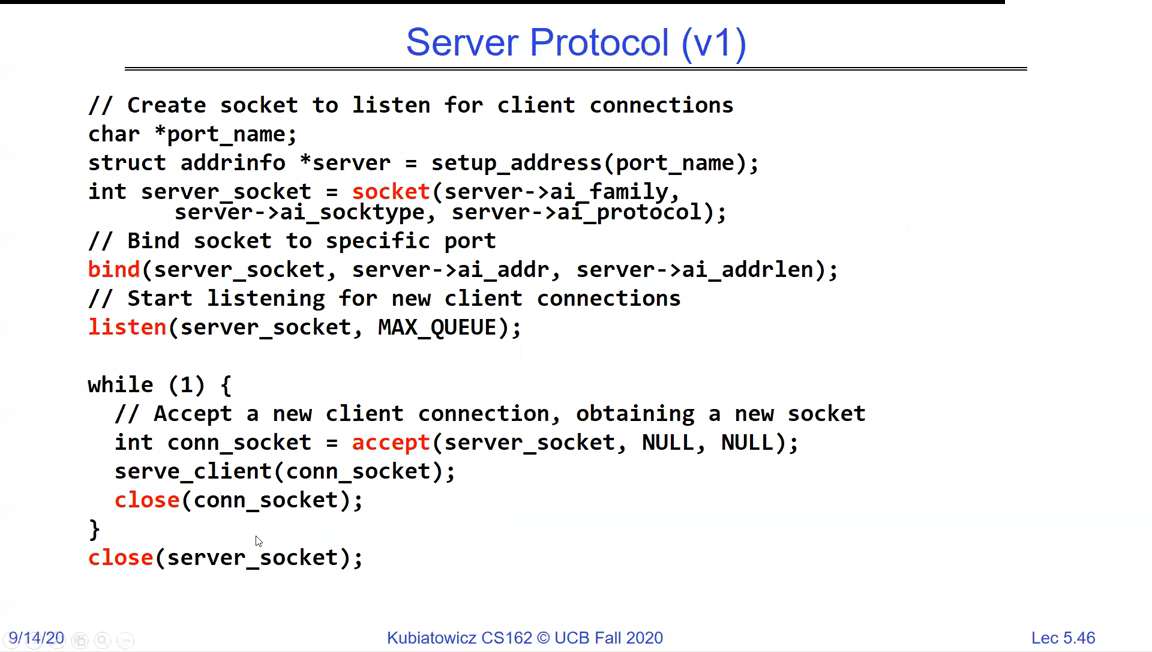
The two sides use complementary calls. A client creates a socket and connects. A server creates a socket, binds it to a port, listens, and accepts connections in a loop.
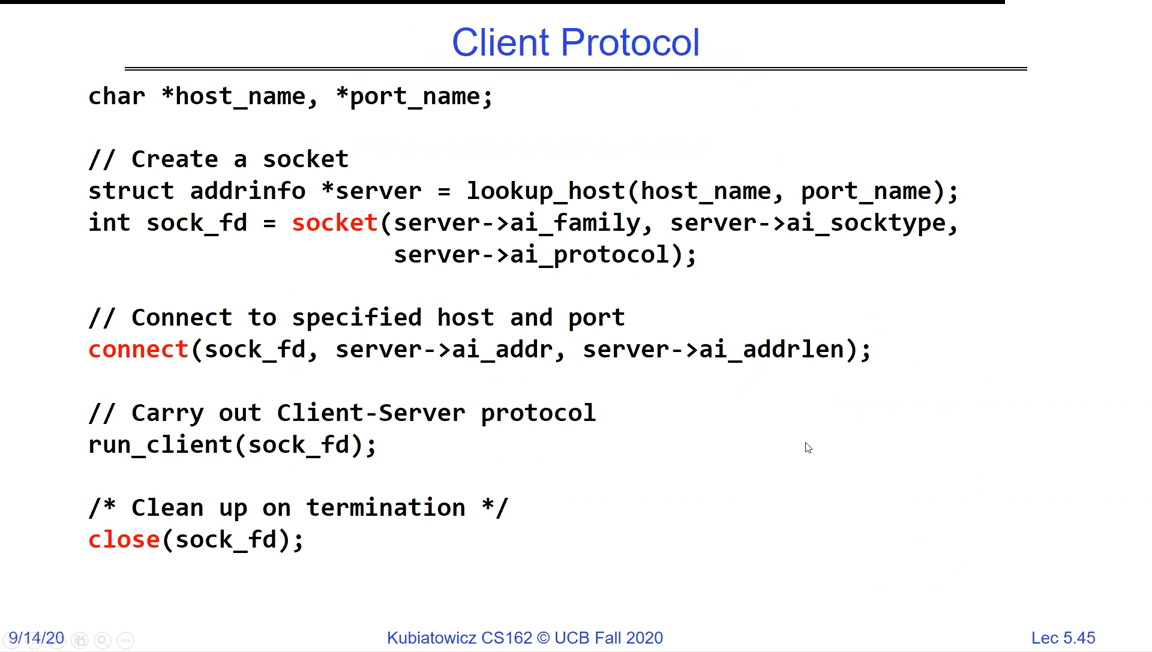
Client Protocol code: look up the host address, create a socket with socket(server->ai_family, ...), connect(sock_fd, server->ai_addr, ...), run the client-server protocol, then close(sock_fd)
The client side: resolve the address, `socket`, `connect`, talk, `close`. Short, because all the waiting happens on the server.
Server Protocol v1 code: create a socket, bind() it to a specific port, listen() with a max queue, then a while loop that calls accept() to get a new connection socket, serves the client, and closes the connection socket
The server side: `socket`, `bind` to a port, `listen`, then loop on `accept`. Each `accept` yields a connection socket the server serves and then closes.

Putting both sides together gives the full lifecycle, and a common design choice: fork a child per connection so a crash or compromise in one is isolated.
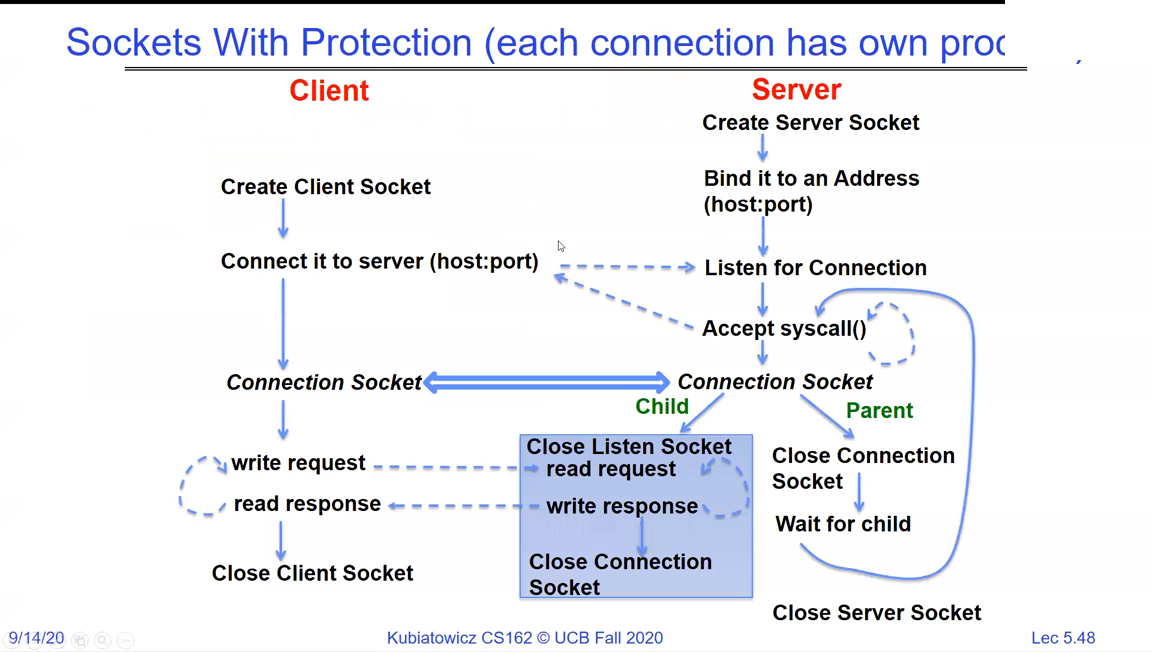
Sockets With Protection: the client creates a socket and connects; the server binds, listens, and on each accepted connection forks a child that serves the request while the parent goes back to accepting; each connection is handled in its own process
Client and server end to end, with protection: the server forks a child to handle each connection while the parent keeps accepting. One connection's failure can't take down the others.

Handling many clients: process, thread, or pool

Forking per connection is safe but heavy. Spawning a thread per connection is cheaper but drops the isolation. Both are unbounded - too many clients exhausts resources - so real servers use a thread pool: a fixed set of workers pulling connections off a queue.
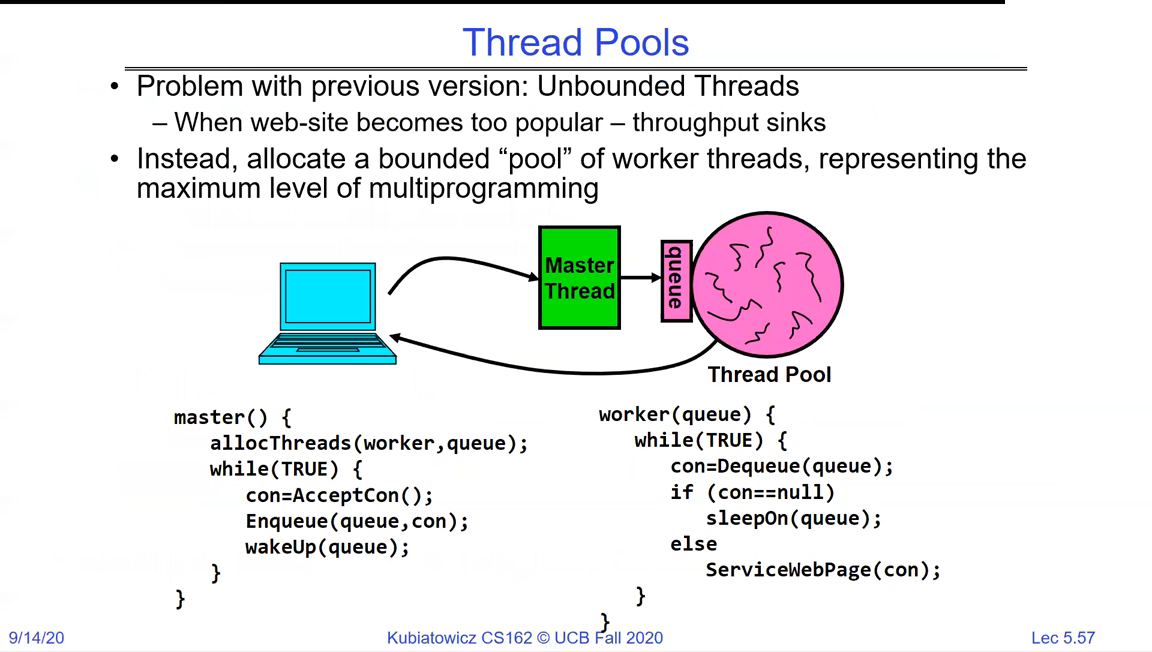
Thread Pools: unbounded threads sink throughput when a site gets too popular; instead allocate a bounded pool of worker threads representing the maximum multiprogramming level; a master thread accepts connections and enqueues them, workers dequeue and serve them
A thread pool bounds concurrency: a master accepts connections onto a queue, and a fixed set of workers serves them. This caps resource use no matter how many clients arrive.
Process, thread, or thread pool per connection?
  • Fork a process per connection - maximum isolation (a crash or exploit is contained), highest cost.
  • Spawn a thread per connection - cheaper to create and switch, but no isolation and still unbounded.
  • Thread pool - a fixed worker set draining a queue; bounds resource use under load. Pick this when you expect many clients.

Recap

  • IPC is built on file I/O: read/write move bytes between processes, because process isolation makes direct memory sharing impossible.
  • A pipe is a one-way, kernel-buffered channel; pipe + fork puts its ends in two processes, and EOF only arrives once all write ends close.
  • A protocol is the agreement (syntax + semantics) layered on the channel.
  • A socket is a bidirectional, networked file descriptor; a connection is a 5-tuple, set up with the socket/bind/listen/accept (server) and socket/connect (client) calls.
  • Servers handle many clients by forking, threading, or - best under load - a thread pool.
  • That completes the foundation: threads, address spaces, processes, dual mode, and the file/IPC abstractions. Next comes making concurrent access to shared state correct - Synchronization.