Creating a cluster with Compute Engine
Following the cluster-creation blueprint, this page works through the choices you make when implementing a cluster on Compute Engine (GCE): the machine type that carries the workload, the deployment option that provisions it, the network setup for accelerators, and the reference architecture that ties it all together.
Choosing a machine type
The first implementation choice is the machine type - the VM family that carries the workload. Families sit on a spectrum from less demanding, cost-sensitive work to performance-intensive HPC and AI, split into general purpose and workload optimized categories.
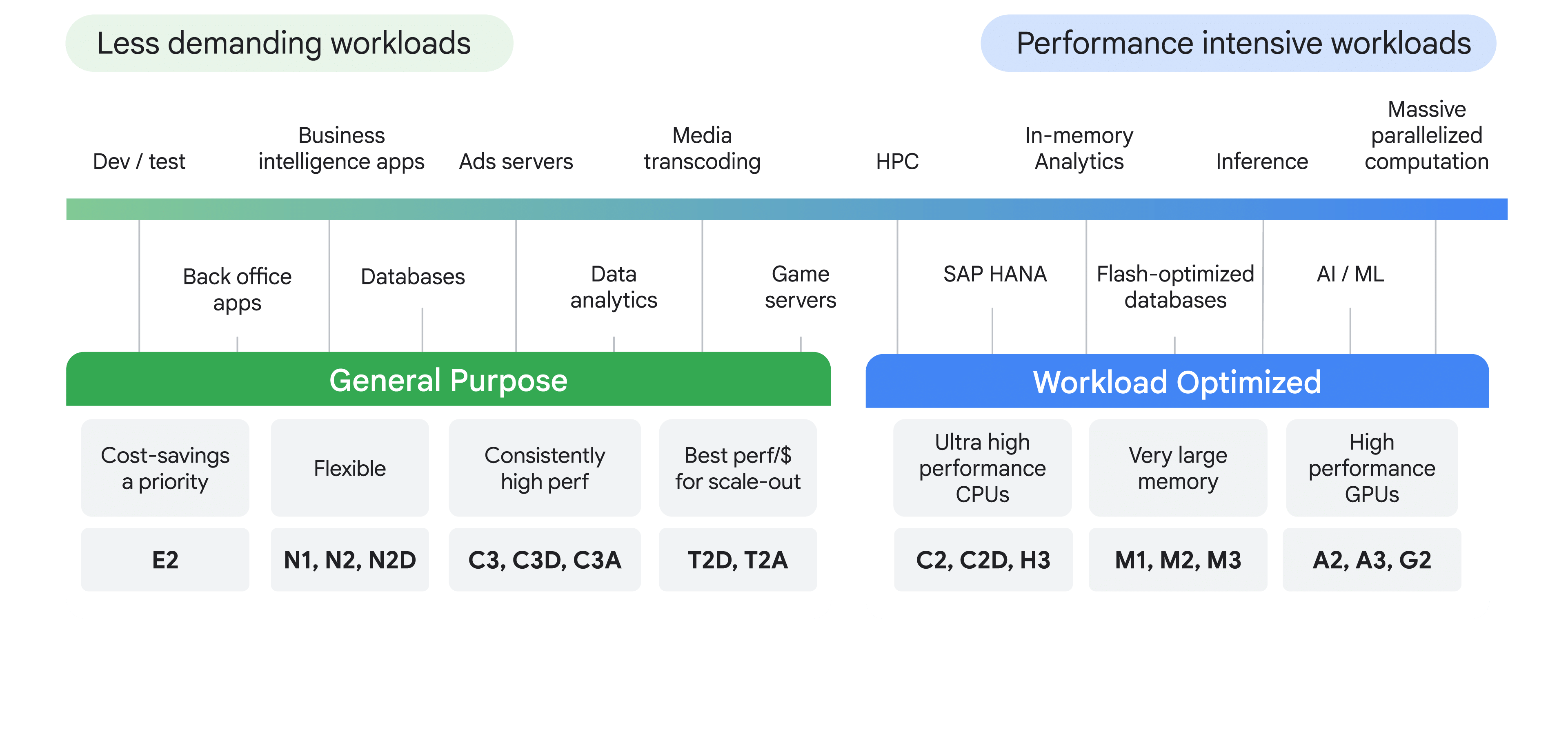
General purpose VM families
For a broad range of everyday workloads where cost-effectiveness and flexibility matter more than raw single-core performance.
Workload optimized VM families
For specialized, demanding workloads that need a specific type of performance - designed for HPC and AI.
Accelerator OS images
When provisioning accelerator machine types (those with pre-attached GPUs), you must specify an operating system (OS) image. Beyond the standard OS suite, Google Cloud offers a specialized set of accelerator OS images tuned for high-performance AI workloads - they ship with the drivers and dependencies for full accelerator functionality out of the box, so the correct, compatible drivers are installed the moment the VM launches.
- GPU drivers - such as NVIDIA drivers, critical for enabling the accelerator hardware.
- Networking drivers - such as Mellanox drivers, which support the high-speed networking (including RDMA) required for distributed AI.
Two OS bases are available - Rocky Linux:
and Ubuntu LTS:
The image family is the identifier you use when creating instances - not a loose OS name. The right one depends on your machine series (e.g. A3, A4) and architecture (x86 or Arm). For the full list, see the Operating system details page in the Compute Engine documentation.
Match the family to what the workload is bound by. General purpose (E2, N1/N2/N2D, C3, T2D) trades raw performance for cost and flexibility; workload optimized families specialize - compute (C2/H3), memory (M-series), or accelerators (A-series for training, G2 for inference).
Choosing a deployment option
Deploying a cluster on Compute Engine offers three deployment types, each with a different level of control versus automation. The right one depends on your workload and your team's expertise.
Within direct VM management, the granularity itself is a choice:
- Single instance - the simplest way to get one GPU or TPU running. Ideal for quick tests, development, or single-node inference.
- Bulk instances - create a fixed number of nodes all at once. Manual but efficient when you know the exact cluster size you need.
- Managed instance groups (MIGs) - automate creation and management of a group of identical VMs, with autoscaling (by schedule or custom metric) and self-healing.
When you need a cluster that scales automatically and repairs itself - for example a stateful inference service under variable demand, or large-scale batch processing - reach for MIGs, not bulk instances. Bulk instances are a fixed set with no autoscaling or self-healing.
Cluster Toolkit
The Cluster Toolkit is a modular, composable toolkit written in Terraform for deploying repeatable, turnkey HPC environments on Google Cloud with best practices built in.
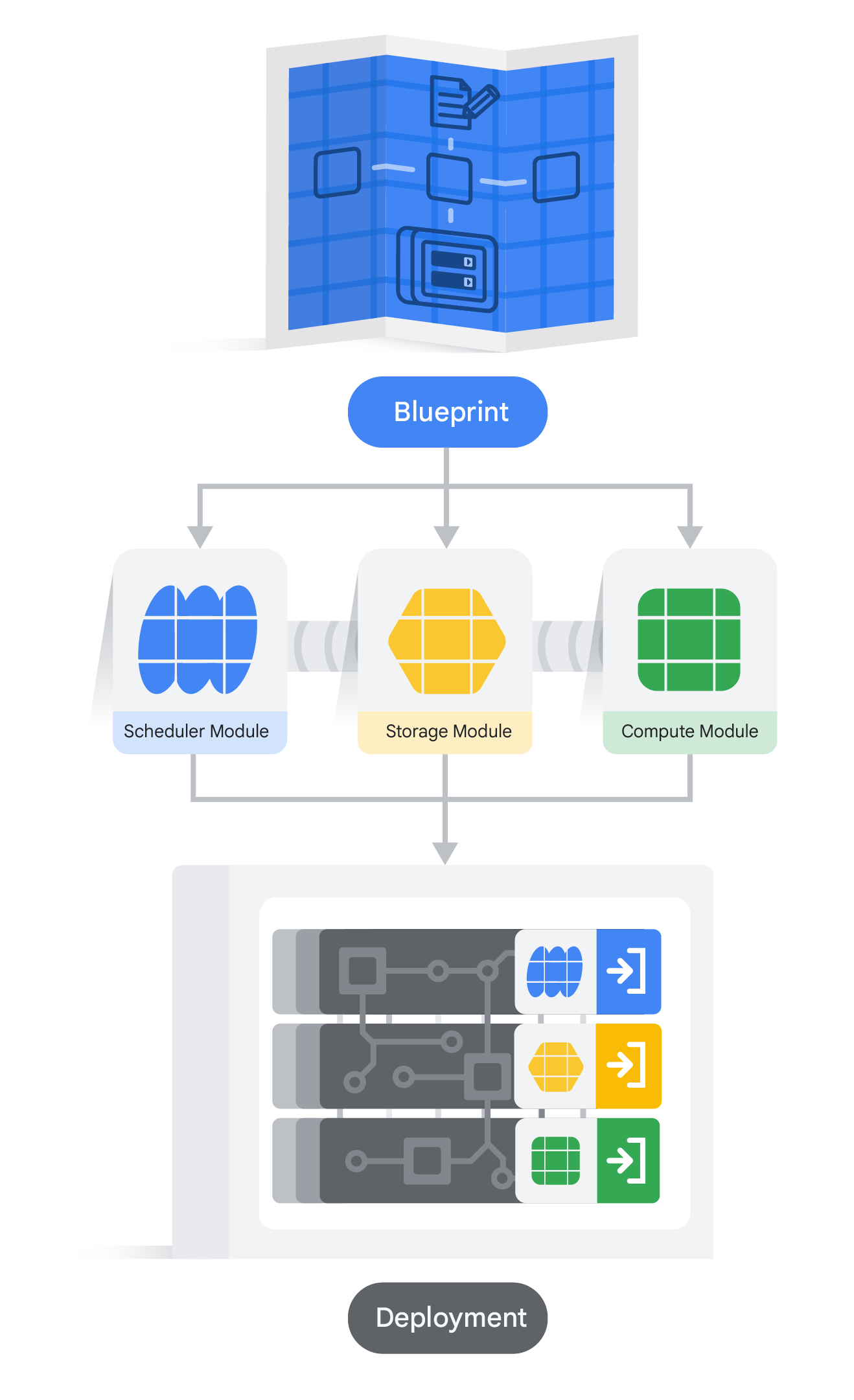
- Blueprint - the design your HPC environment is built to follow. Can be workload-specific, general purpose, or partner-focused; several examples ship with the toolkit, and you can customize or build your own.
- Modules - reusable building blocks the blueprint references, grouped by type (scheduler, storage, compute).
- Deployment - the modules deploy into the HPC infrastructure and run your workloads.
Demo: deploying an HPC cluster with Slurm
The demo enables the required APIs, clones the toolkit from GitHub, builds its
binary, then uses a YAML blueprint with ghpc create and ghpc deploy to
provision a Slurm cluster via Terraform. It finishes by connecting to the login
node and running a sample job with srun, then a batch job with sbatch - Slurm
spins up a compute node per job and removes it once idle, keeping costs down.
Networking for GCE instances
Accelerator-optimized machine types often need a specialized multi-VPC network configuration - regardless of whether you create standalone VMs, bulk instances, or MIGs. Separating traffic types keeps the high-bandwidth accelerator path from being congested by general system traffic.
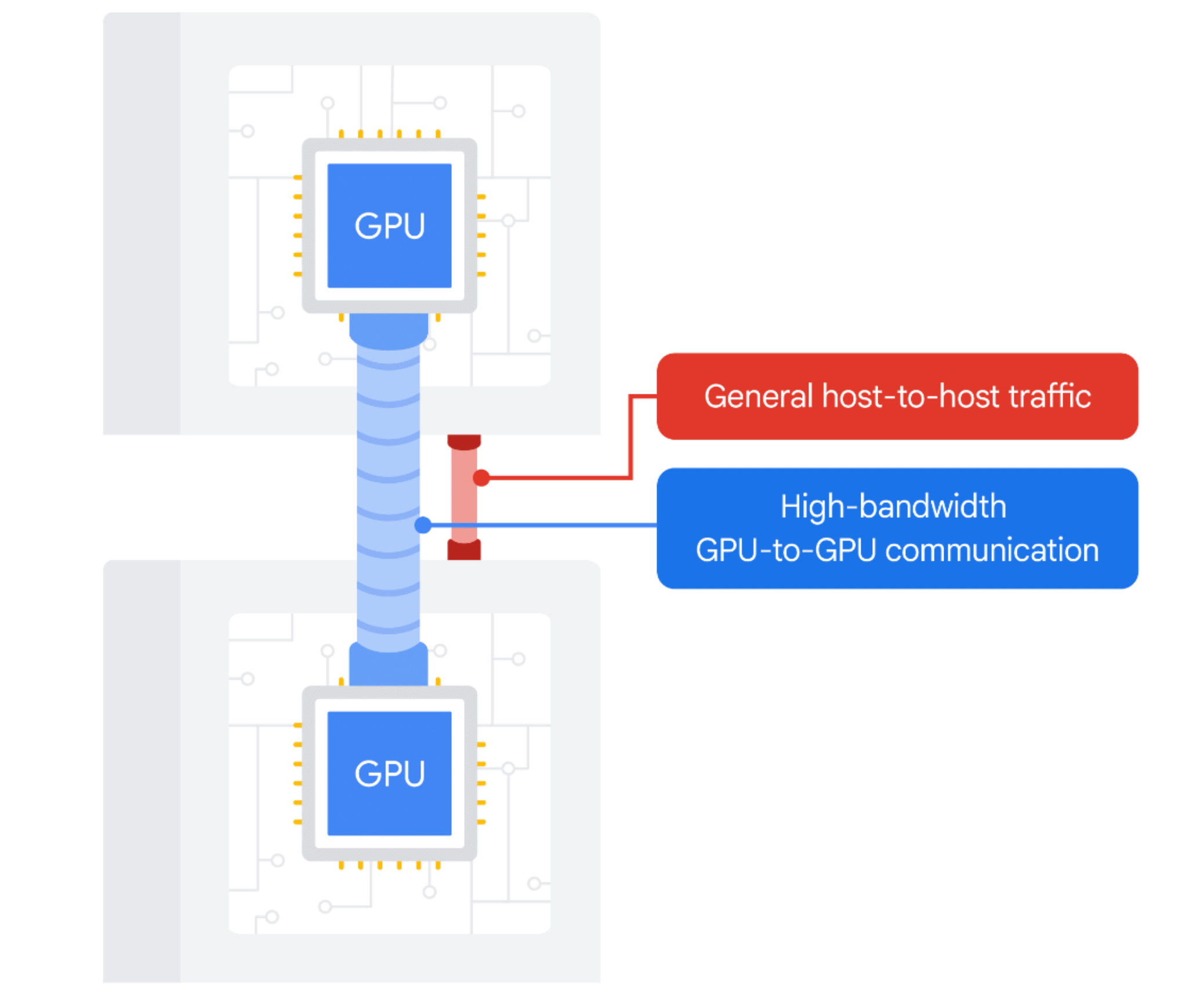
- General host-to-host traffic - standard networking for system operations and general data transfer.
- High-bandwidth GPU-to-GPU communication - dedicated, low-latency pathways for performance-intensive tasks that involve direct communication between accelerators on different VMs.
The separation ensures critical high-bandwidth traffic isn't congested by general system traffic - but the specific network requirements and optimal configuration depend on the chosen machine type and accelerator. There is no single layout.
Placement policies
By default, when you create VMs you only specify their zone. For latency-sensitive applications that need VMs physically close together, placement policies act like a seating arrangement that puts your VMs "in the same room" instead of on opposite sides of a crowded stadium. Which policy you use depends on how the VMs were created:
Compact placement policies tell Compute Engine "place these VMs as close as
possible" - a best-effort attempt. For applications where every millisecond counts,
the maxDistance field tightens that further.
A lower maxDistance value packs the VMs closer together, but it also
increases the chance that some VMs fail to be created if the space isn't
available. You are trading placement guarantees against capacity availability.
Workload policies are a specialized "seating chart" for a MIG - you define the type of work the VMs do and how they should be physically arranged:
- Workload type - for low-latency needs, specify a high-throughput workload type, and Compute Engine tries to place the MIG's VMs as close as possible.
- Strict colocation - the
maxTopologyDistancefield sets a maximum physical distance between VMs. If it can't be met, the MIG won't create the VMs - an all-or-nothing deal for ultimate performance. - Accelerator topology - for workloads using GPUs with an inter-accelerator network (e.g. A4X VMs with NVLink), places VMs to optimize the high-speed connections between accelerators.
Demo: exploring compact placement policies
The demo creates a policy with gcloud compute resource-policies create using
--collocation=COLLOCATED, attaches it to two identical n2-standard-8 VMs via
--resource-policies, then runs gcloud compute instances describe on each. The
physical host location strings come back identical - confirming both VMs land
on the same host for the lowest possible network latency.
Both minimize network latency by physically co-locating VMs. Compact placement policies apply to individual/bulk VMs and are best-effort. Workload policies apply to MIGs and can enforce strict colocation for maximum performance.
Reference architecture
Building high-performance AI/ML infrastructure on Compute Engine is more than spinning up a VM - it is designing an ecosystem that supports the whole workload lifecycle, from data ingestion to model serving. In this architecture, compute nodes are segmented into partitions by purpose and hardware.
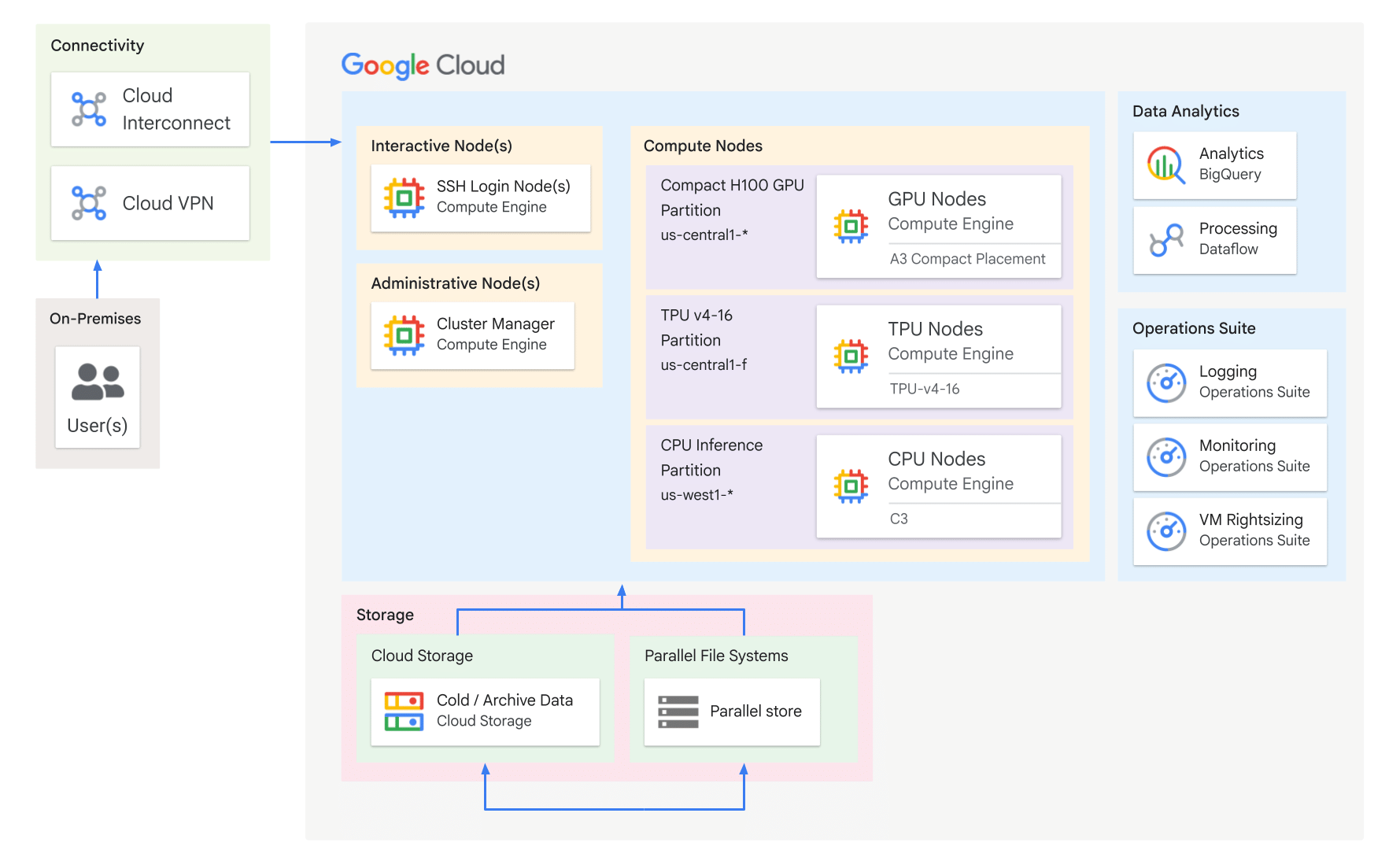
Connectivity
An AI architecture is often hybrid, with some components on-premises. A secure, high-speed connection ties the two together.
Access nodes
- Interactive nodes - specialized workstations for administrative tasks and real-time interaction. For Linux VMs you can use a bastion host: a hardened, dedicated GCE VM that is the single controlled external entry point into the private cluster network.
- Administrative nodes - SSH login nodes and a cluster manager, where administrators and data scientists log in to manage the infrastructure and run quick ad-hoc tasks.
Compute nodes
The core engine room - large-scale worker nodes optimized for intense, parallelizable tasks, split into accelerator partitions.
- GPU nodes - training and inference, with GPUs such as the NVIDIA H100 (e.g. the A3 H100 partition).
- TPU nodes - massive, data-parallel training jobs on Google's custom ML silicon (e.g. a TPU v4-16 partition).
- CPU nodes - general-purpose workhorses for data preprocessing, pre-/post-processing, and inference on non-accelerator models.
Storage
A slow storage system bottlenecks even the fastest GPUs, so the architecture separates cold/archive storage from high-speed parallel access.
- Parallel file systems (PFS) - the high-speed "scratchpad" for active workloads (e.g. DDN EXAScaler, IBM Spectrum Scale), distributing data across storage servers for high throughput and low latency.
- Cloud Storage - the main data warehouse: scalable, durable object storage for raw training data, model checkpoints, and results.
- Cloud Storage FUSE - mounts a GCS bucket as a local file system, exposing GCS data to compute nodes without copying it.
Operations and analytics
- Operations Suite - mission control: Logging and Monitoring track cluster and workload health (GPU utilization, pod errors, system logs) and surface issues proactively. It also covers VM rightsizing.
- Data analytics - BigQuery (serverless data warehouse) analyzes large datasets, and Dataflow (managed ETL/processing) transforms data - both for pre-processing training data and analyzing model results.
Increasing cluster security with IAP
A bastion host is a valid way to manage access, but Google Cloud offers a managed, zero-trust alternative: Identity-Aware Proxy (IAP). Instead of a publicly exposed VM, IAP controls access to internal VMs based on user identity and IAM policies, not network location.
IAP SSH tunneling routes SSH-port traffic through Google's network edge directly
to the VM's internal IP. High-value compute nodes stay completely private
while data scientists still connect with a simple gcloud compute ssh - provided
they hold the correct IAM permissions. No public bastion required.
For regularly transferring multi-terabyte datasets from on-prem to Cloud Storage, Cloud Interconnect is the choice - its dedicated, high-throughput, low-latency link bypasses the public internet for faster, more reliable transfers. Cloud VPN saves cost and adds flexibility, but its performance over the public internet is too variable for reliable large-scale transfers.