Deploying with GKE for inference
Model training gets the attention, but it is inference - using a trained model to make predictions on new data - that delivers real-world value. This page covers architecting inference workloads on Google Kubernetes Engine (GKE): the deployment workflow, the reference architecture, and the model-aware GKE Inference Gateway that optimizes gen AI serving.
Architecting for inference on GKE
A single prediction is fast; the business challenge is serving millions of them quickly and cost-effectively, which needs scalable, efficient infrastructure. GKE is a robust platform for serving large-scale models in production.
What is AI inference?
AI inference is the "doing" part of AI: applying the knowledge a model learned during training to new, unseen data. Train a model to recognize dogs, and inference is the moment you hand it a new photo and it identifies the dog - whether that is analyzing customer purchases, generating text, or scoring a transaction.
Why GKE for inference serving
- Efficient price-performance - choose from a wide range of accelerators, so you only pay for the performance you need.
- Scalable performance - scale out with native Kubernetes features like horizontal Pod autoscaling (HPA) combined with custom, AI-specific metrics.
- Full portability - built on open standards, so containerized models and Kubernetes manifests move between environments.
- Ecosystem support - integrates with tools like Kueue for job queuing and Ray for distributed computing.
The GKE inference workflow
Running an inference workload on GKE follows a clear, structured path.
- Containerize your model - package the model server, weights, and dependencies into a Docker container: a portable, self-contained unit ready to deploy.
- Create a GKE cluster - provision a cluster with the right node types and accelerators (NVIDIA L4, A100, or TPUs). Standard or Autopilot.
- Deploy as a Kubernetes Deployment - a Deployment manifest defines the container image, replica count, and resource requests (including the accelerator).
- Expose the service - a Kubernetes Service gives the deployment a network endpoint. For gen AI workloads, this is where the GKE Inference Gateway comes in.
- Handle requests and scale - GKE distributes requests to Pods; horizontal Pod autoscaling (HPA) grows or shrinks replica count with demand.
Securing internal apps with IAP for GKE
The Inference Gateway optimizes traffic for the model; Identity-Aware Proxy (IAP) secures any other web-facing service in the cluster - a private inference API, a Ray dashboard, a Kubeflow UI. IAP enforces a zero-trust model, checking a user's identity and IAM permissions before granting access to anything running inside the cluster.
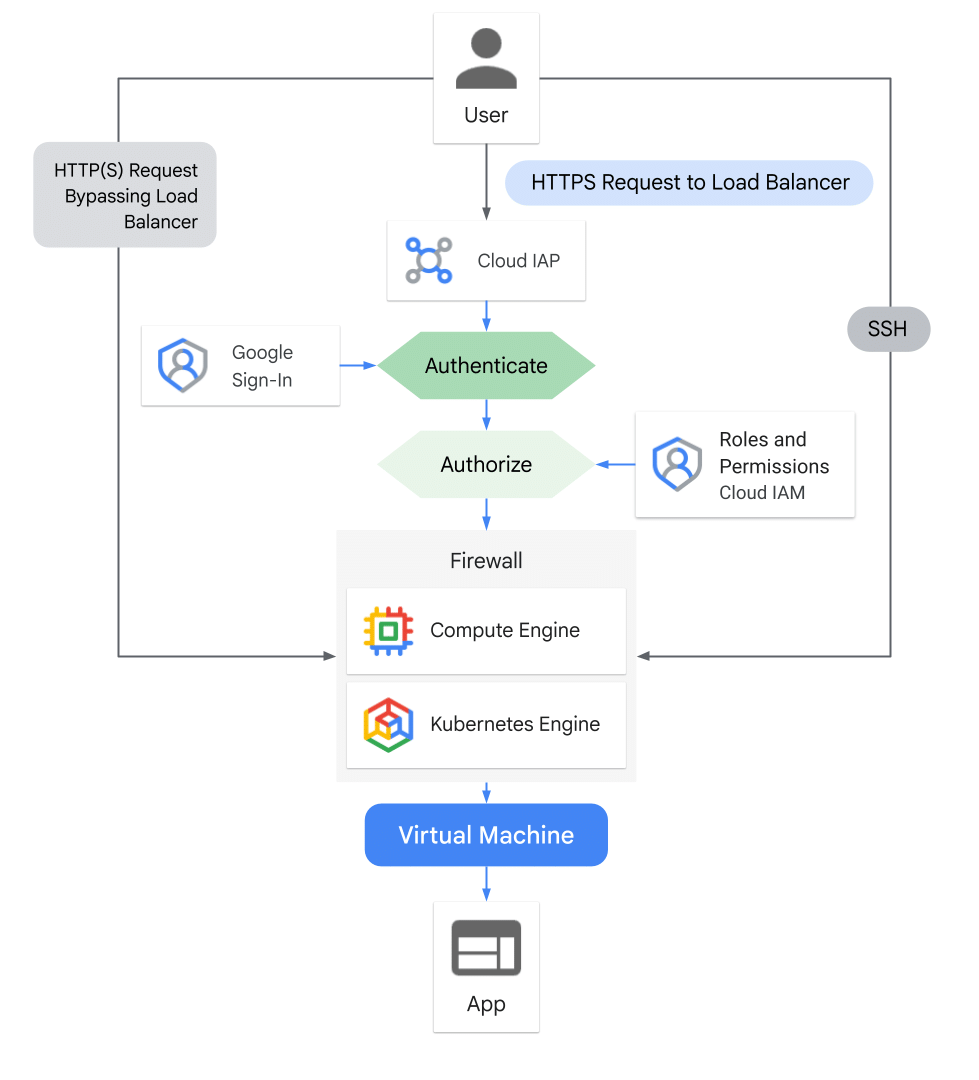
- Secure internal tools - IAP is enabled on the Cloud Load Balancer fronting your GKE ingress, protecting private tools and dashboards without firewall changes or a VPN.
- Identity-based access - access is granted by the user's Google identity plus the IAP-secured Web App User IAM role, not by managing network lists.
This lets you securely expose critical, non-public cluster services to MLOps engineers and data scientists with a fully managed service.
Inference workload patterns
The type of inference dictates your architectural needs. There are three main patterns, each with a different goal.
When a model must analyze every event as it occurs and return a per-request decision within milliseconds (e.g. blocking a fraudulent transaction inline), that is real-time (online) inference - not streaming (a continuous flow of data) and not batch (deferred bulk predictions).
GKE inference reference architecture
The GKE inference reference architecture is a blueprint for deploying and managing inference workloads on GKE - a standardized, repeatable methodology that reduces operational complexity and supports principles like GitOps.
Why use a reference architecture
- Standardize deployments - a consistent deploy process that reduces errors and promotes automation.
- Optimize for performance and cost - autoscaling plus hardware acceleration (GPUs, TPUs) for high-throughput, low-latency workloads.
- Enable scalability - automatically scale to real-time demand and absorb sudden traffic spikes.
- Promote ops best practices - versioning, CI/CD, monitoring, logging, and security across the model lifecycle.
- Accelerate implementation - a clear, actionable path to a working inference workload.
The architecture
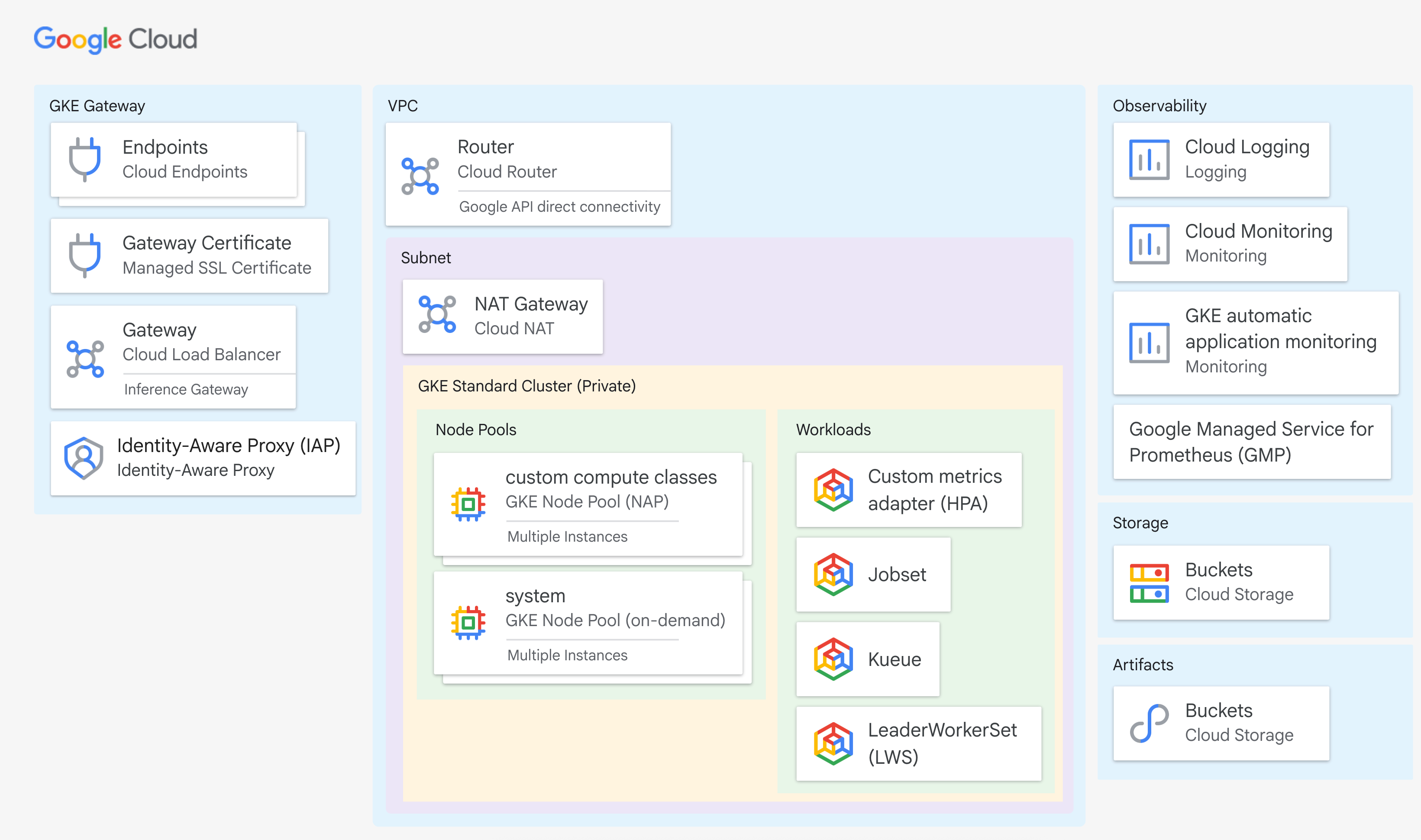
Setting up the GKE environment comes down to accelerator capacity, cluster configuration, model-level optimization, and continuous monitoring.
Accelerator capacity and cluster choice
Before anything else, ensure you have sufficient quota for the GPUs or TPUs you need in your target region - if not, request an increase well in advance. Then choose a cluster mode:
Cluster and node pool configuration
- Regional clusters - for production, distribute inference Pods across multiple zones for fault tolerance and higher availability.
- Node autoprovisioning (NAP) - in Standard clusters, works with the cluster autoscaler to create new node pools with the right machine types and accelerators when Pods need resources that are not available.
- Custom compute classes (CCC) - define specialized node pools with fallback logic (e.g. try an NVIDIA A100 first, fall back to an L4 if unavailable) so Pods are always schedulable.
Model-level optimization
Infrastructure is only half the story - optimize the model itself to hit performance and cost targets.
- Quantization - reduce the precision of weights and activations (e.g. FP32 to INT8) to shrink model size and speed up inference; evaluate carefully for accuracy trade-offs.
- Tensor parallelism - split a model's tensors across multiple accelerators so massive LLMs that will not fit on one GPU can still run.
- Paged attention and flash attention - optimize the memory-intensive attention mechanism to cut memory use and raise throughput for long sequences and large batches.
For a small model with low baseline traffic but unpredictable spikes where the goal is the most cost-effective deployment: run it on an Autopilot cluster (pay only for Pod resources, no node management) and quantize the model (smaller, faster, cheaper to serve). Standard clusters add operational overhead you do not need here.
Continuous monitoring
- Metrics - use Cloud Monitoring for QPS, latency (p99), and GPU/TPU utilization. A custom metrics adapter lets the HPA scale on model-server metrics like
requests_per_secondormodel_latency_ms. - Logging - centralize app and system logs in Cloud Logging; use structured logging to query specific errors or performance issues.
- Tracing - integrate Cloud Trace or OpenTelemetry to trace a request through the whole inference pipeline and pinpoint bottlenecks in distributed microservices.
- Plan your infrastructure - choose Autopilot vs Standard, secure quota, and configure for HA with regional clusters and NAP.
- Optimize your models - quantization and tensor parallelism to fit accelerators; paged attention for memory efficiency.
- Enable observability - Cloud Monitoring, Cloud Logging, and tracing for deep insight into workload performance.
- Use GKE's AI tools - Inference Quickstart, Inference Gateway, and fast model-loading tools like Cloud Storage FUSE and image streaming.
Optimizing inference with GKE Inference Gateway
The GKE Inference Gateway optimizes serving of LLMs and other generative AI workloads. Traditional load balancers are not suited to the complex, variable nature of AI inference; the Inference Gateway uses model-aware routing to improve performance, lower costs, and simplify operations. Think of it as a smart traffic cop keeping your models available, secure, and ready for demand.
What it does
- Traffic management - automatically routes each request to the right model, useful when running multiple models or versions on one cluster.
- Scalability - works with GKE to scale models up or down with demand, spinning up resources for sudden request surges.
- Security and control - a secure, controlled entry point that enforces security policies and manages access, protecting models from unauthorized use.
How GKE Inference Gateway works
The gateway monitors model-server load using AI-specific metrics - pending request queue length and KV-cache utilization - and routes each incoming request to the least-loaded GPU or TPU, evening out work across your infrastructure.
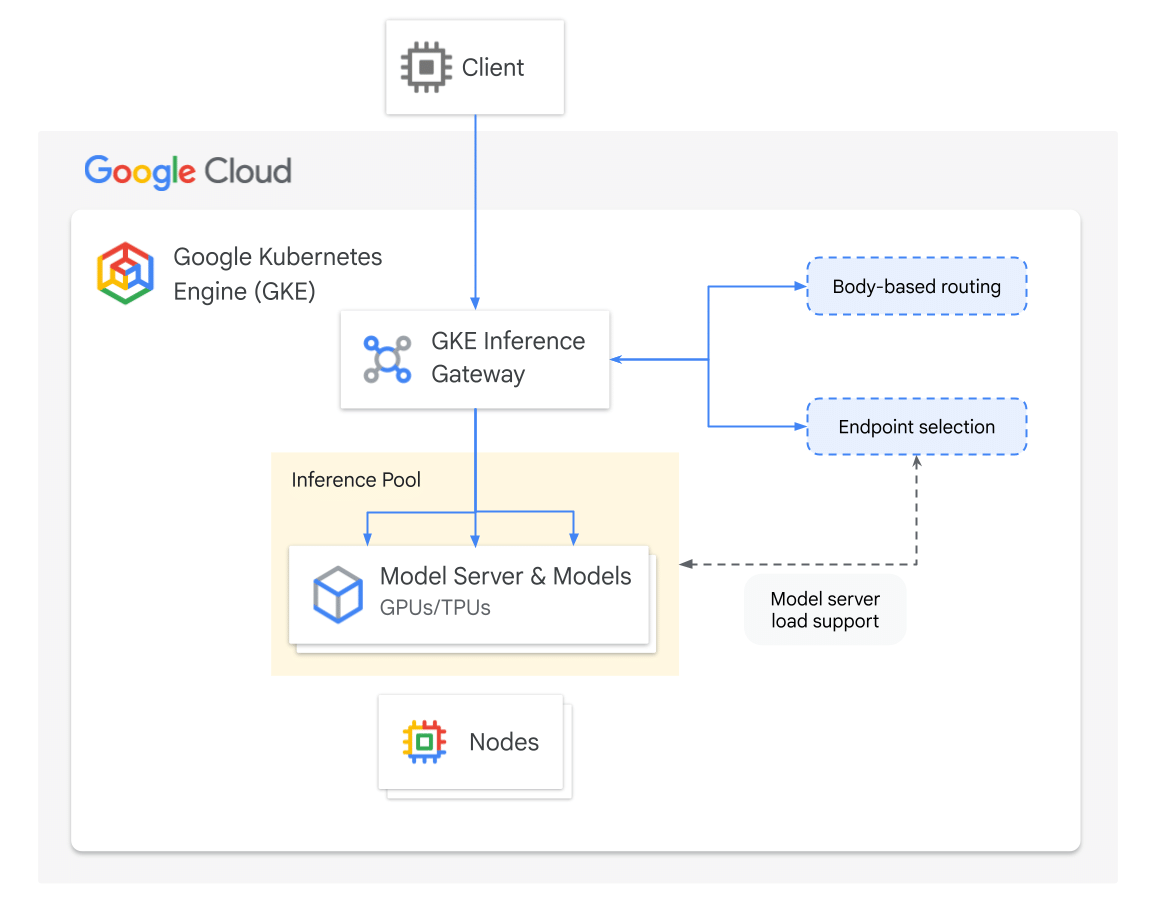
Acting as an intelligent intermediary between a client request (often formatted with the OpenAI API spec) and a model instance, the gateway processes each request through specialized extensions:
The request lifecycle: (1) client sends GET /completions; (2) the
gateway selects an InferencePool as a K8s service using the model name (OpenAI
API spec); (3) it picks the least-loaded model replica with the in-memory
LoRA adapter; (4) it routes to the InferencePool and optimal replica per
priority.
- Higher throughput - up to a 40% increase by using GPU and TPU resources more efficiently.
- Lower latency - reduce response times by up to 60%.
By prioritizing latency-sensitive requests and managing accelerator capacity efficiently, the gateway fairly serves multiple AI use cases from a single cluster without hurting user experience.
Demo: GKE Inference Gateway vs traditional load balancing
The demo load-tests one model (vLLM Llama-2-7B) under two setups: a traditional GKE gateway with round-robin load balancing, then the GKE Inference Gateway with inference-optimized load balancing.
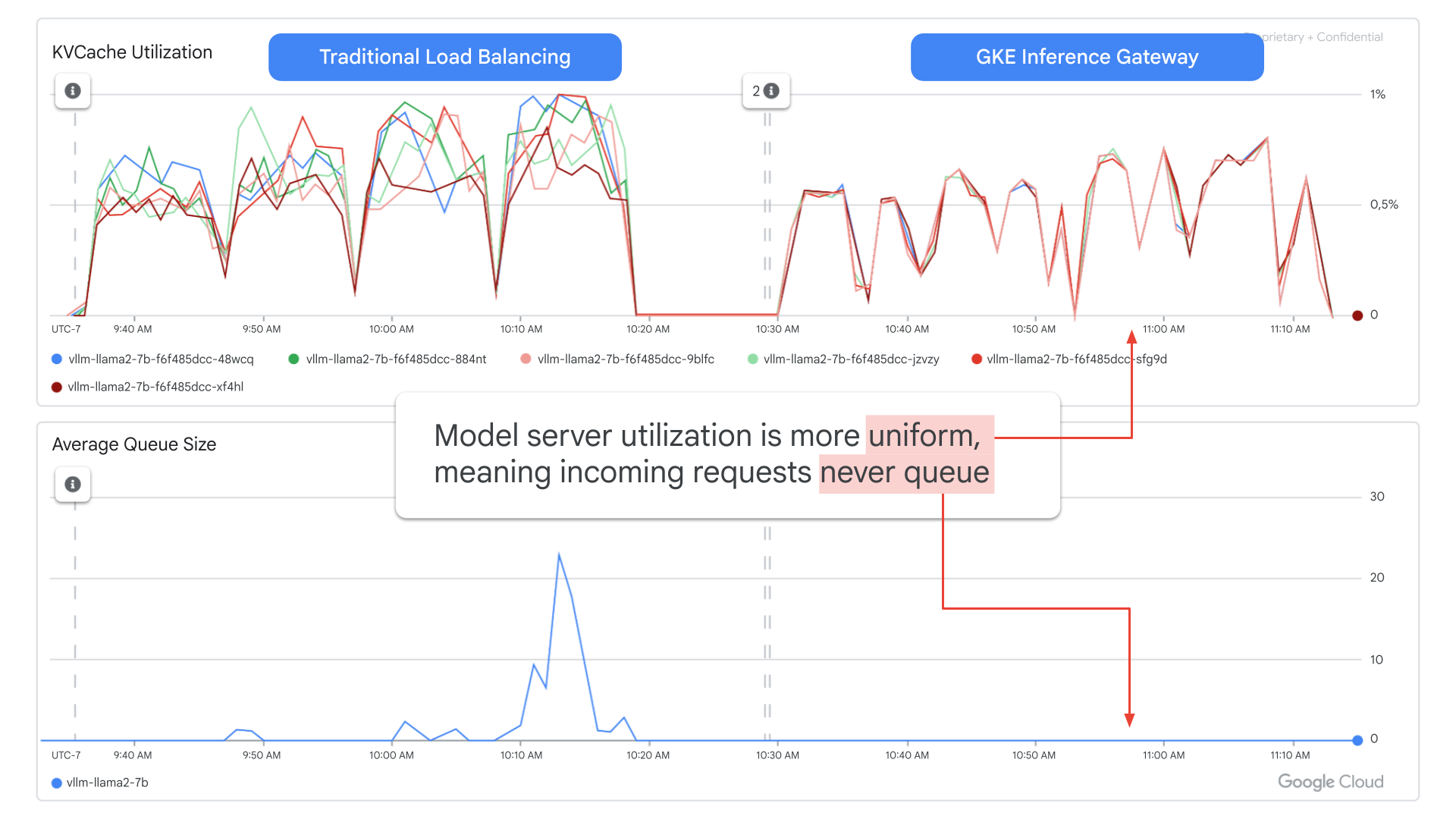
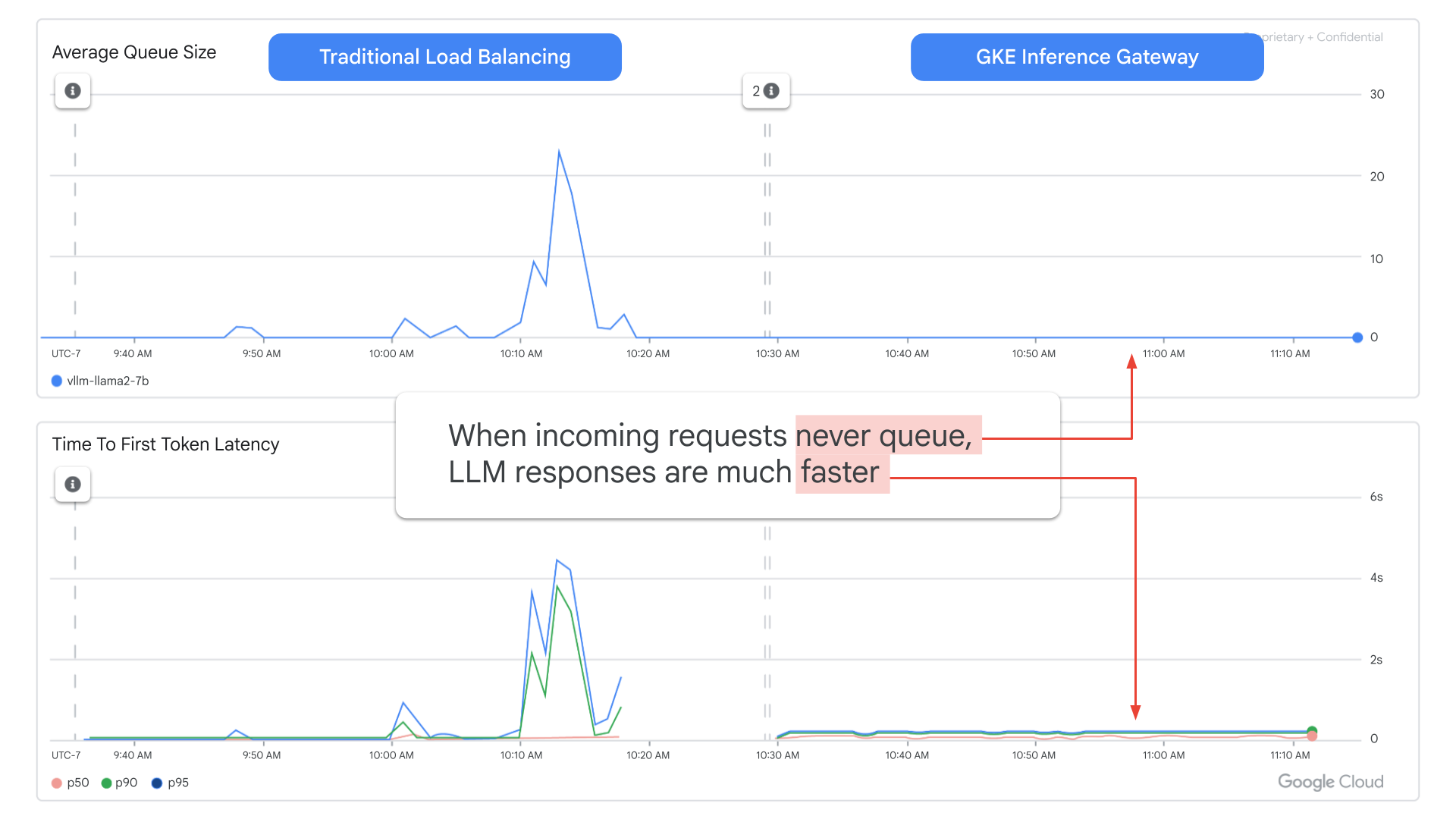
Traditional round-robin balancing ignores per-server load, so some model servers saturate their KV-cache. New requests then queue, which spikes time-to-first-token latency. Routing by KV-cache utilization distributes load evenly, eliminates queuing, and keeps latency constant.
- The GKE Inference Gateway is a specialized, model-aware load balancer for gen AI and LLM serving.
- It routes on AI-specific metrics (request queue length, KV-cache utilization) to the least-loaded replica.
- Result: efficient resource use, higher throughput and lower latency than traditional load balancers.